Advanced Tabs: User & AI-Ready Structure for SharePoint
Revolutionize your SharePoint with Advanced Tabs. Try it today and experience the difference structured navigation can make.
Reduce Clutter and Improve Navigation with Advanced Tabs!
Are you looking for a way to make your SharePoint site cleaner, easier to navigate, and more structured? Advanced Tabs for SharePoint helps transform long, cluttered pages into organized, application-style layouts.
Advanced Tabs allows you to group multiple web parts into clearly defined tab sections, each presenting focused content within a structured boundary. This means you can create a more dynamic and engaging user experience without overwhelming your page with excessive scrolling or stacked content. By introducing logical segmentation, you improve usability for users while also providing clearer structure for Microsoft Copilot and AI agents to interpret your content more effectively.
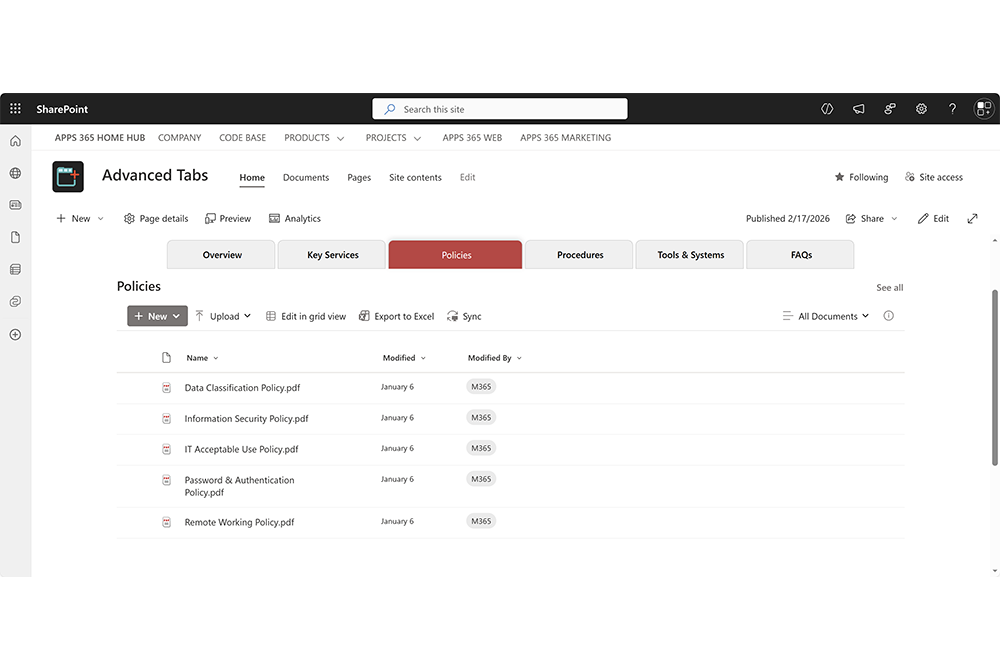
Advanced Tabs for SharePoint enhances your intranet by transforming long, cluttered pages into clean, structured, tabbed layouts. By grouping related web parts into clearly defined sections, it creates a more intuitive navigation experience, reduces scrolling, and delivers a modern, application-style interface. Try Advanced Tabs and see how structured navigation improves both user experience and page clarity.
Overall, Advanced Tabs is a powerful solution for improving the organization and usability of your SharePoint intranet. It not only creates a cleaner, more professional visual experience, but also introduces logical content boundaries that support Microsoft Copilot and AI agents, helping prepare your SharePoint for modern, AI-driven workflows.

Transform long, cluttered SharePoint pages into clean, organized tabbed layouts. Deliver a more intuitive navigation experience and create a modern, application-style interface for your intranet.
With our easy-to-use Advanced Tabs configuration panel, you can quickly group web parts into clearly defined sections without writing any code. Simply assign web parts to tab labels, customize layout and styling, and control how content is displayed. Then use the Advanced Tabs SPFx web part to insert structured, responsive tab navigation into any SharePoint page or Microsoft Teams tab.
Who's using APPS 365 LTD Productivity Tools for SharePoint?










Improve SharePoint. Here’s How…
Overall, Advanced Tabs helps transform SharePoint into a more structured, user-friendly environment by reducing clutter, improving navigation, enhancing visual consistency, and introducing clear content boundaries that benefit both users and AI agents.
Improved navigation
Advanced Tabs groups related web parts into clearly labeled tab sections, making large SharePoint pages easier to navigate while creating structured content boundaries that AI agents can interpret more accurately.
Enhanced usability
By displaying only relevant content at a time, Advanced Tabs reduces cognitive load for users and introduces predictable structure that helps Microsoft Copilot and AI agents understand page context more clearly
Modern, Structured Experience
Tabbed layouts create a clean, application-style interface that improves visual clarity and establishes logical content segmentation for both users and AI-driven systems.
AI-Ready Content Organization
Advanced Tabs organizes content into defined sections that improve contextual understanding for Copilot and enterprise AI agents, supporting more accurate summaries and smarter content retrieval.
Improved Accessibility & Clarity
Clear tab labels and structured grouping enhance accessibility for users while also providing AI agents with more consistent signals about content relationships and hierarchy.
Increased productivity
Users find information faster through structured tab navigation, and AI agents benefit from clearer content boundaries - improving efficiency across both human and AI-assisted workflows.
Advanced Tabs for SharePoint FAQs
Welcome to the Advanced Tabs for SharePoint FAQ section!
Advanced Tabs is a modern SharePoint Framework (SPFx) web part that transforms long, cluttered SharePoint pages into structured, tab-based layouts. It groups related web parts into clearly defined sections, reducing scrolling and improving navigation while introducing logical content boundaries that benefit both users and AI agents.
Advanced Tabs organizes web parts into structured tab containers rather than leaving them stacked vertically. Each tab creates a defined content boundary with a clear label, making page layout more predictable, easier to navigate, and more logically segmented.
This structured grouping improves content clarity for users and provides cleaner contextual signals for Microsoft Copilot and enterprise AI agents.
Copilot and AI agents interpret page structure, context, and content relationships when generating summaries or retrieving information.
Advanced Tabs helps by:
Creating clear content segmentation
Grouping related web parts under semantic tab labels
Reducing mixed-context content blocks
Introducing predictable DOM boundaries
Making page sections easier to interpret
This can improve contextual understanding, reduce ambiguity, and support more accurate AI-generated responses.
Advanced Tabs uses an optimized DOM reparenting approach built within SPFx. Instead of duplicating or iframe-wrapping content, it safely moves existing web part elements into a centralized tab container while preserving their original structure and lifecycle.
This approach:
Maintains performance
Avoids unnecessary re-rendering
Prevents ID conflicts through scoped zone detection
Preserves compatibility with modern SharePoint editing
The result is a clean structural layout without breaking native SharePoint behavior.
No. Advanced Tabs is built using SPFx and works natively within SharePoint Online. It does not duplicate content or introduce external rendering layers. By structuring content into tabs, it can actually improve perceived performance by displaying only relevant content at a time.
Instead of stacking all web parts vertically, Advanced Tabs displays one logical section at a time within a tab. Users can switch between sections instantly without navigating away from the page, significantly reducing vertical scrolling on content-heavy pages.
Advanced Tabs runs entirely within your Microsoft 365 tenant. It does not transmit or store SharePoint data outside your environment. It operates as a SharePoint-hosted SPFx solution and respects existing permissions and governance controls.
Yes. Clear tab labeling, structured grouping, and predictable navigation improve accessibility. Advanced Tabs supports keyboard interaction and structured navigation patterns to align with accessibility best practices.
Yes. Advanced Tabs is fully responsive and supports desktop, tablet, and mobile layouts. Horizontal and vertical configurations adapt to provide a clean experience across screen sizes.
Yes. Advanced Tabs includes a full-featured 7-day free trial. After the trial period, a license is required to continue using the web part.
Simple And Flexible Pricing
Site License
£999 /Year
- Up to 500 Tenant Users In Organisation
- 1 Site
- Latest Updates
- Premimum Support
- SharePoint Versions: Online, 2019
Site Collection
£2499 /Year
- Up to 2500 Tenant Users In Organisation
- Unlimited Sites in 1 Site Collection
- Latest Updates
- Premimum Support
- SharePoint Versions: Online, 2019
Tenant
£3999 /Year
- Up to 10000 Tenant Users In Organisation
- Unlimited Sites in Tenant
- Latest Updates
- Premimum Support
- SharePoint Versions: Online, 2019
Microsoft 365 SharePoint Productivity Pack
APPS 365 LTD
We offer flexible licensing options tailored to your needs. Contact us today to discuss the best solution for your organisation.


All our applications are fully approved and published on Microsoft AppSource
Image Maps
- Boost productivity by converting any image into a clickable navigation hub.
- Simplify access to documents, pages, and apps with visual shortcuts.
- Enhance branding with fully customizable designs that match your corporate style.

Activate your complete licensed version of Image Maps for SharePoint today
Advanced Tabs
- Improve productivity by grouping related web parts into clear, structured tab sections.
- Simplify access to services, documents, and tools with intuitive tab navigation.
- Reduce page clutter and scrolling for a cleaner user experience.
- Support Microsoft Copilot and AI agents with logical content segmentation and clear boundaries.

Activate your complete licensed version of Image Maps for SharePoint today
NavPilot
- Increase efficiency with a centralised launchpad for all key resources.
- Empower individuals to add private personal links alongside company links.
- Align branding by tailoring the interface to your organization’s look and feel.

Activate your complete licensed version of NavPilot for SharePoint today
Power Popups
- Reach the right people with targeted, customisable popup messages.
- Control timing and impact by scheduling and designing alerts your way.
- Maximise visibility with flexible display options like popups or panels.

Activate your complete licensed version of Power Popups for SharePoint
Alerts Fusion
- Never miss a message with scheduled alerts tailored to your audience.
- Increase engagement by displaying alerts in panels, popups, or banners.
- Drive compliance by ensuring updates reach the right people at the right time.

Activate your complete licensed version of Alerts Fusion for SharePoint
Short URL App
- Simplify sharing with professional, branded short links.
- Track performance with analytics to measure clicks and engagement.
- Stay in control by managing, editing, and customizing URLs anytime.

Activate your complete licensed version of Short URL for SharePoint
Purchase the Microsoft 365 SharePoint Productivity pack and work smarter, faster today.