
Interactive Image Maps: The Future of SharePoint

Interactive Image Maps: The Future of SharePoint
ABOUT IMAGE MAPS FOR SHAREPOINT
Create Hotspot Navigation in SharePoint with Image Maps!
Are you looking for a way to make your SharePoint site cleaner, easier to navigate, and more structured? Advanced Tabs for SharePoint helps transform long, cluttered pages into organized, application-style layouts.
Advanced Tabs allows you to group multiple web parts into clearly defined tab sections, each presenting focused content within a structured boundary. This means you can create a more dynamic and engaging user experience without overwhelming your page with excessive scrolling or stacked content. By introducing logical segmentation, you improve usability for users while also providing clearer structure for Microsoft Copilot and AI agents to interpret your content more effectively.
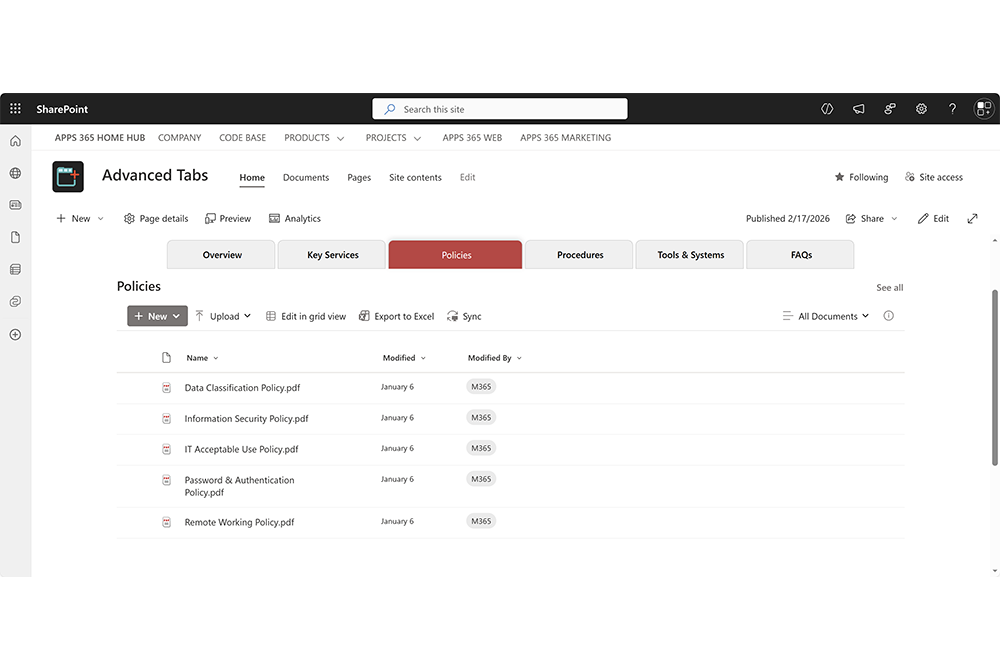
Advanced Tabs for SharePoint enhances your intranet by transforming long, cluttered pages into clean, structured, tabbed layouts. By grouping related web parts into clearly defined sections, it creates a more intuitive navigation experience, reduces scrolling, and delivers a modern, application-style interface. Try Advanced Tabs and see how structured navigation improves both user experience and page clarity.
Overall, Advanced Tabs is a powerful solution for improving the organization and usability of your SharePoint intranet. It not only creates a cleaner, more professional visual experience, but also introduces logical content boundaries that support Microsoft Copilot and AI agents, helping prepare your SharePoint for modern, AI-driven workflows.

Transform long, cluttered SharePoint pages into clean, organized tabbed layouts. Deliver a more intuitive navigation experience and create a modern, application-style interface for your intranet.
With our easy-to-use Advanced Tabs configuration panel, you can quickly group web parts into clearly defined sections without writing any code. Simply assign web parts to tab labels, customize layout and styling, and control how content is displayed. Then use the Advanced Tabs SPFx web part to insert structured, responsive tab navigation into any SharePoint page or Microsoft Teams tab.
Who's using Image Maps for SharePoint?










Improve SharePoint. Here’s How…
Improved navigation
Image Maps for SharePoint can make it easier for users to find their way around your SharePoint intranet, especially if you have a large and complex site.
Enhanced visual appeal
Using images in your navigation can make your intranet more visually appealing and engaging, which can help to keep users engaged and interested in using the site.
Improved accessibility
Image Maps for SharePoint can also be made accessible to users with disabilities, such as those who use screen readers, by providing alternative text for each image link.
Enhanced usability
Image Maps for SharePoint can make it easier for users to navigate your Intranet, which can improve the overall usability of the site.
Better organization
Image maps can help to organize your intranet more effectively, allowing users to quickly and easily find the information they need.
Increased productivity
By making it easier for users to find the information they need, image maps can help to increase productivity by reducing the time and effort required to locate important resources.
Image Maps for SharePoint FAQs
SharePoint Image Maps is THE SharePoint Add-in to create interactive images with eye-catching content from within SharePoint. For the uninitiated, an image map is one image with multiple “clickable” hotspots. An image like this with clickable regions, can replace the need for custom page layout design and several text links or buttons on a SharePoint page, making the page look sharper and offering visitors a more intuitive user interface.
With our easy to use, advanced drag and drop editor you can quickly customise, edit and generate image maps for any image without coding. Simply choose your Image, define the selected areas of your image, set actions and display content for when you roll over these areas. Images contained within a Picture Library will have the option to create an Image Map directly from the image’s Context Menu. You can even set the content text to be taken from a SharePoint List for easy updates.
Use the Image Map Webpart to easily insert your Image Maps into any SharePoint Pages.
The generated Image Map is fully responsive and optimized to work across all devices. Image Maps even works with Keyboard Accessibility.
Image Maps for SharePoint is a SharePoint hosted App so data NEVER leaves your organisations SharePoint environment. Image Maps for SharePoint is 100% secure and ALL data resides within your Tenant.
Yes. We offer a Free 14-day trial that can be downloaded form Microsoft AppSource.
PRICING
Simple And Flexible Pricing
Site License
£ 999 / Year
- Up to 500 Tenant Users In Organisation
- 1 Site
- Latest Updates
- Premimum Support
- SharePoint Versions: Online, 2019, 2016, 2013
Site Collection
£ 2999 / Year
- Up to 2500 Tenant Users In Organisation
- Unlimited Sites in 1 Site Collection
- Latest Updates
- Premimum Support
- SharePoint Versions: Online, 2019, 2016, 2013
Tenant
Best Choice
£ 4999 / Year
- Up to 10000 Tenant Users In Organisation
- Unlimited Sites in Tenant
- Latest Updates
- Premimum Support
- SharePoint Versions: Online, 2019, 2016, 2013
NEXT STEPS
Try Image Maps for SharePoint Free for 14 days. Start your Free trial now to see the value and then purchase a License later.
SOLUTIONS
Solve flexible work challenges with Microsoft Places
Empower workplace flexibility and schedule coordination. Microsoft Places works across your everyday apps—so you can stay in the flow of work.

View the people and experiences at a specific location—or across your workplace.


ABOUT IMAGE MAPS FOR SHAREPOINT
Take Your SharePoint to the Next Level with Image Maps for SharePoint
Are you looking for a way to make your SharePoint site more interactive and visually appealing? Look no further than Image Maps for SharePoint!
Image Maps for SharePoint allow you to turn a single image into a hotbed of clickable areas, each linking to a different page or document within your SharePoint site. This means you can create a dynamic and engaging user experience without cluttering your page with too many buttons or links.
Image Maps for SharePoint can enhance your SharePoint intranet by providing a more intuitive navigation experience and adding visual appeal. Try Image Maps for SharePoint to see the benefits for yourself.
